Disk health (SMART)
The Disk Health panel appears on bare-metal servers only. SMART data comes from the physical drive itself, and virtualized disks — virtio, Xen, Hyper-V, and anything inside a VM, LXC, or other container — don’t pass it through. If your server is a VPS and has no Disk Health panel, nothing is wrong: there is no drive health to read, and the panel stays away rather than showing an empty table.
On bare metal, the panel sits on the server’s page and lists every physical NVMe and SATA drive with its SMART verdict:

The table, drive by drive
Section titled “The table, drive by drive”| Column | Meaning |
|---|---|
| Drive | Kernel device name (sda, nvme0n1). |
| Type | NVMe, SSD, or HDD. |
| SMART Test | The drive’s overall SMART self-assessment. Passed is healthy; a failing drive is what the SMART health failed alert rule fires on. |
| Power-On | Lifetime hours the drive has been powered (13,305 h), from the drive’s own counter. |
| Errors | Entries in the drive’s SMART error log (SATA), or media and data-integrity errors (NVMe). When a SATA drive has reallocated sectors — bad sectors it has swapped for spares — their count shows under it in amber, such as 24 realloc. A few is common on an older drive; a count that keeps climbing is an early sign of a failing drive, which is what the New reallocated sectors alert rule fires on. |
| Wearout | How much of the drive’s rated endurance is used — 0% is a new drive, and higher is more worn. Reported for SSDs and NVMe drives; spinning disks don’t expose an endurance figure. |
Click a drive for the full picture — model, capacity, temperature, and the
serial number, which is how you match a sda in the dashboard to the
physical drive in your hands:
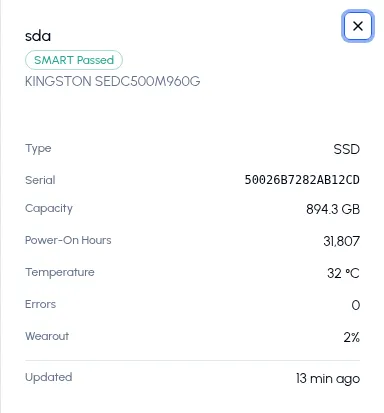
The serial number is the one hardware identifier the collector reports — What the collector collects lists every SMART field that leaves the server.
When the data arrives
Section titled “When the data arrives”The collector takes its first SMART snapshot when its service starts, so the panel shows up within a couple of minutes of installing on a bare-metal server. After that it refreshes every 15 minutes — drive health doesn’t move fast, and each read wakes the drives up.
The privileges behind it
Section titled “The privileges behind it”Reading SMART needs low-level device access the collector otherwise
doesn’t have, so the install script probes /sys/block and grants only
what your hardware calls for. On a server with SATA drives, the install
prints:
💽 SATA/SAS detected — enabling SMART (CAP_SYS_RAWIO)NVMe gets a slightly broader grant, and a server with no physical drives gets nothing at all — Requirements & permissions has the exact table. If you add a physical drive to a server later, re-run the install command: it re-probes the hardware and extends the grant, and the new drive joins the panel on the next SMART cycle.