Alert rules reference
Every alert template carries the same 19 rules — you choose which are enabled and tune each rule’s threshold, window, and notification count. To edit them, open Alerts → Templates in the dashboard and click a template. How templates, channels, reminders, and acknowledgment fit together is covered in How alerting works; this page is the per-rule reference.
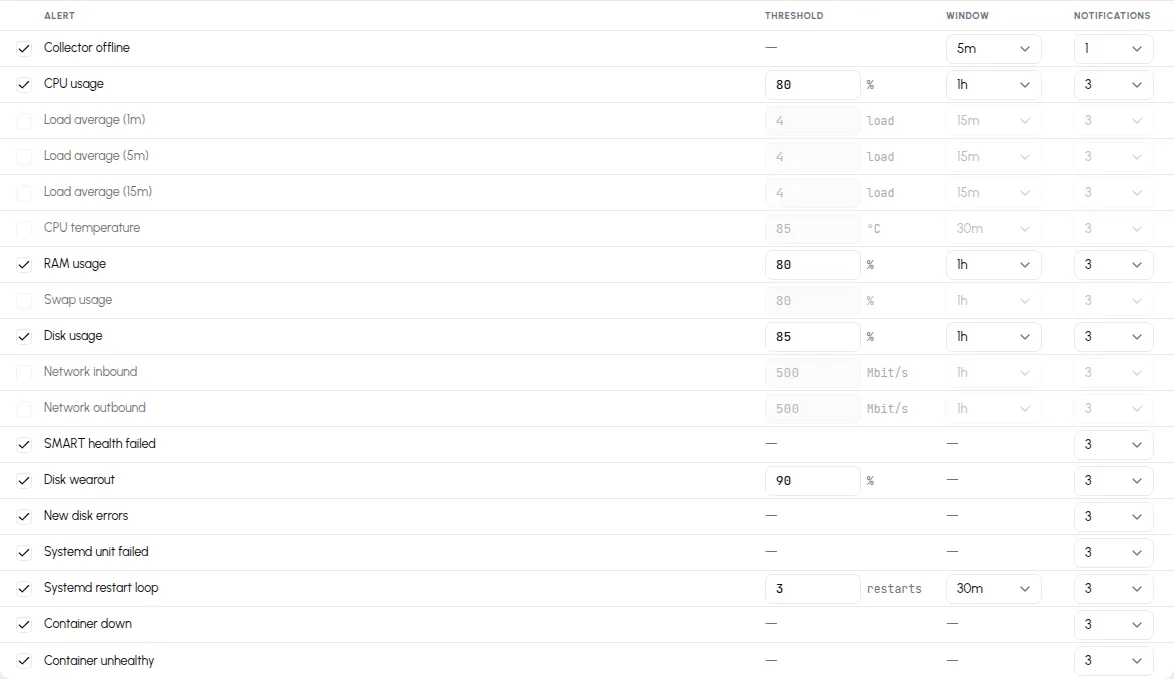
All rules are evaluated every 60 seconds, but they don’t all decide the same way. There are three kinds:
- Threshold rules compare the metric’s average over the rule’s window against the threshold. To fire, the comparison must fail on 2 consecutive checks; to resolve, it must pass on 3 consecutive ones — so a single noisy sample neither fires nor resolves anything.
- State rules watch a condition that is simply true or false — a failed drive, a failed unit, a silent collector. They fire on the first check that sees the condition and resolve on the first that doesn’t.
- Event rules fire once per occurrence and land in the incident history already resolved — there is no ongoing state to watch, so there’s nothing to resolve later. Each new occurrence is its own incident.
Threshold rules
Section titled “Threshold rules”“Default” reads threshold / window. The window average is what’s tested: CPU usage at 80% / 1h fires when the hour-long average crosses 80%, not when one sample spikes.
| Rule | Default | Threshold limits | Enabled by default |
|---|---|---|---|
| CPU usage | 80% / 1h | 1–100% | yes |
| Load average (1m) | 4 / 15m | 0.1–1024 | no |
| Load average (5m) | 4 / 15m | 0.1–1024 | no |
| Load average (15m) | 4 / 15m | 0.1–1024 | no |
| CPU temperature | 85 °C / 30m | 30–120 °C | no |
| RAM usage | 80% / 1h | 1–100% | yes |
| Swap usage | 80% / 1h | 1–100% | no |
| Disk usage | 85% / 1h | 1–100% | yes |
| Network inbound | 500 Mbit/s / 1h | 1–100,000 | no |
| Network outbound | 500 Mbit/s / 1h | 1–100,000 | no |
Disk usage is evaluated per filesystem: each mount gets its own
incident, so a full /var and a full /home are two separate alerts.
State rules
Section titled “State rules”| Rule | Fires while | Enabled by default |
|---|---|---|
| Collector offline | The server’s last report is older than the rule’s window (default 5m). | yes |
| SMART health failed | A drive’s overall SMART self-assessment reports failure. | yes |
| Disk wearout | A drive’s wearout has reached the threshold (default 90%). | yes |
| Systemd unit failed | A .service unit is in the failed state. | yes |
| Container down | A container stopped without a clean exit. | yes |
| Container unhealthy | A container’s own healthcheck reports unhealthy. | yes |
Notes with edges:
- Collector offline accepts windows of 5 minutes and up — shorter values are rejected on save. It defaults to a single notification: a server that goes offline tells you once, not five times. It’s also the one alert that fires when the server can’t report — every other rule needs data to arrive.
- Container down doesn’t fire on clean stops: exit code 0, or 143
(a
docker stophonored with a graceful shutdown), is treated as intentional. Containers running for less than 2 minutes get a grace period, so restarts and fresh deploys don’t fire it. - Per-entity rules (drives, units, containers, mounts) open one incident
per entity, named after it — the incident for a failed
redis.servicesays so.
Event rules
Section titled “Event rules”| Rule | Fires when | Enabled by default |
|---|---|---|
| New disk errors | A drive’s error counters increase compared to the last check. | yes |
| New reallocated sectors | A SATA drive’s reallocated-sector count increases compared to the last check. NVMe drives don’t report one. | yes |
| Systemd restart loop | A unit restarts 3 times (default, 1–50) within the window (default 30m). | yes |
An event rule notifies once per occurrence. In the Incidents list its incidents appear directly under Resolved — that’s by design, not a missed fire.
Windows and notifications
Section titled “Windows and notifications”- Every window dropdown offers the same steps: 1m, 5m, 10m, 15m, 30m, 1h, 2h, 6h, 12h, 24h.
- Notifications is the total number of messages an incident may send while firing, including the first — 1 to 5 (default 3). Reminder spacing comes from the template; see How alerting works.
Resolving, reopening, and removed entities
Section titled “Resolving, reopening, and removed entities”- If a fired incident resolves and its condition returns within 15 minutes, the same incident reopens instead of a new one starting, so a flapping condition stays one line in your history. The reopen counts as a new occurrence: a fresh “fired” notification is sent, any acknowledgment is cleared, and the reminder schedule starts over.
- When a watched entity disappears — a container removed, a transient
unit cleaned up with
systemctl reset-failed, a drive pulled — its open incident resolves on its own, silently. - One honest edge: that auto-resolve needs a report proving the entity is gone. If the collector itself stops reporting, or the last entity of that kind vanishes (say, the only alerting mount is unmounted), there is no such report — the incident stays firing until its notification count is spent. Remove the incident’s cause, or acknowledge it, rather than waiting it out.
- Muting a server resolves its open incidents silently and pauses evaluation — the mute switch is described in How alerting works.