How alerting works
Alerting is on from your first server: the account gets a Default template and an Account email channel automatically, so a server going offline already sends you an email. Everything lives under Alerts in the dashboard, split into Incidents, Templates, and Channels.
Templates bundle rules
Section titled “Templates bundle rules”As the Templates page puts it: “A template bundles alert rules, channels, and reminder policy. Each server follows one template (the account default unless assigned another).”
The Default template can’t be deleted, but you can edit it, duplicate it, or create more with New template and assign them per server. Its rule table has a row per rule type — 12 of 19 enabled out of the box:
| Rule | Threshold | Window | Notifications |
|---|---|---|---|
| Collector offline | — | 5m | 1 |
| CPU usage | 80% | 1h | 3 |
| RAM usage | 80% | 1h | 3 |
| Disk usage | 85% | 1h | 3 |
| SMART health failed | — | — | 3 |
| Disk wearout | 90% | — | 3 |
| New disk errors | — | — | 3 |
| New reallocated sectors | — | — | 3 |
| Systemd unit failed | — | — | 3 |
| Systemd restart loop | 3 restarts | 30m | 3 |
| Container down | — | — | 3 |
| Container unhealthy | — | — | 3 |
Seven more can be switched on per template: load averages (1m/5m/15m), CPU temperature, swap usage, and network inbound/outbound rates. Thresholds, windows, and per-rule notification counts are all editable in the template editor.
How incidents fire and resolve
Section titled “How incidents fire and resolve”Rules are evaluated server-side every minute; an incident is created per server and rule.
- Threshold rules (CPU, RAM, disk usage, …) need two consecutive breaching evaluations to fire and three clean ones to resolve, so a single spike doesn’t page you.
- State rules (Collector offline, SMART health failed, Container down, …) fire on the first breaching observation and resolve on the first healthy one. Collector offline fires when the server hasn’t checked in for the rule’s window — 5 minutes by default, which is also the minimum.
- An incident that fired, resolved, and breaches again within 15 minutes reopens instead of starting a new incident, so a flapping condition stays one line in your history. The reopened incident notifies again and needs a fresh acknowledgment.
Notifications, reminders, acknowledgment
Section titled “Notifications, reminders, acknowledgment”When an incident fires, the template’s channels get a notification. The template editor states the reminder policy exactly:
Reminders repeat at this interval until a rule’s Notifications count is used up (the count includes the initial alert). Acknowledging an incident stops its reminders.
- Remind every is per template (default 6h, minimum 30 minutes).
- The Notifications count is per rule, 1–5 total including the initial alert. Collector offline defaults to 1 — a server going offline notifies once per occurrence, not every 6 hours.
- Notify when incidents resolve (on by default) sends a RESOLVED notification when the incident resolves — including for incidents you acknowledged.
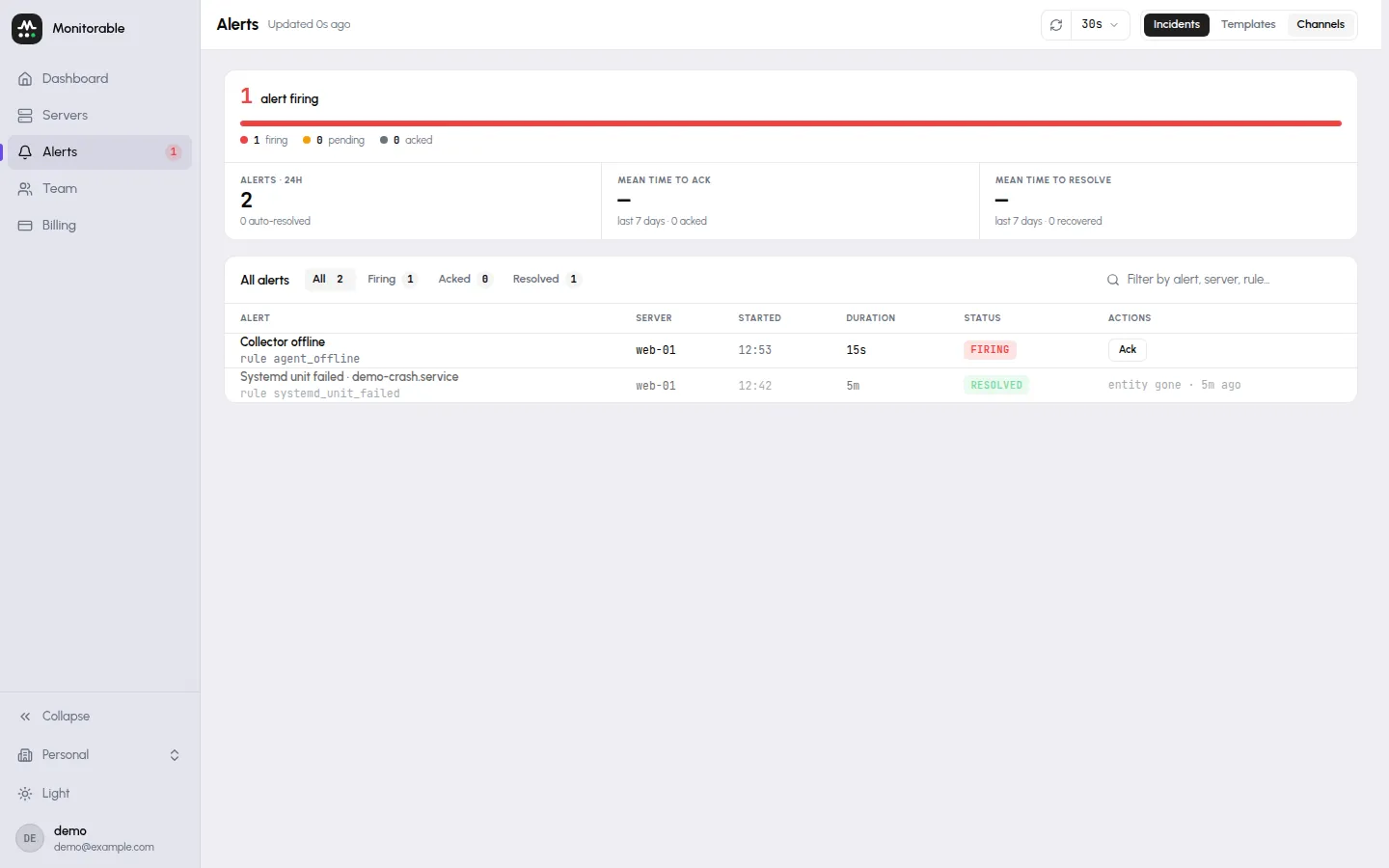
Acknowledge from the Incidents page. It can’t be undone. It silences reminders and clears the incident from the Alerts count in the sidebar, which only counts incidents nobody has acknowledged — but the incident itself stays open, and listed, until the condition is actually gone.
Per-server: assignment and mute
Section titled “Per-server: assignment and mute”Each server’s page has an Alerts on this server card listing its open incidents, with two controls: Template (which template this server follows — “Account default” unless you pick another) and Mute alerts. Muting closes the server’s open incidents without notifying and stops evaluation entirely until you unmute.
The Incidents page
Section titled “The Incidents page”Alerts → Incidents lists incidents with an All / Firing / Acked / Resolved filter. Each row shows the alert (rule and, where it applies, the unit or container), the server, when it started, how long it has been open, its status, and an Ack (acknowledge) action.
The page shows every open incident plus everything from the last 7 days. Resolved incidents are kept for 90 days, then removed automatically.
Notification delivery is a separate topic — where alerts go, testing a channel, and daily caps are covered in Notification channels.